
You can move documents between folders, ensuring that all documents are available in the correct folder and available to users who need them.
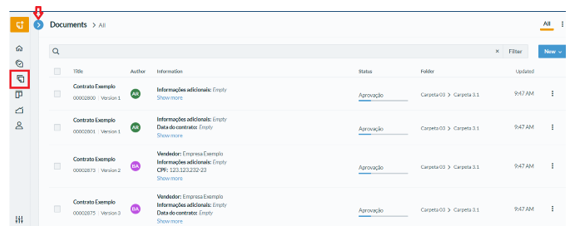
To move a single document, simply access the “Documents” page and select the desired document. After selecting the document, you must click on the "Three Points" button and select the "Move" option.
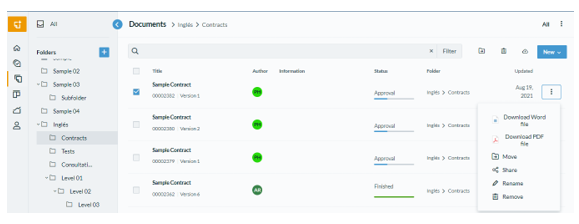
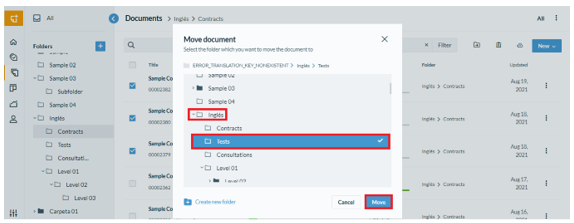
At the end, just select the desired folder and subfolder, select “Move” and the procedure will be complete:
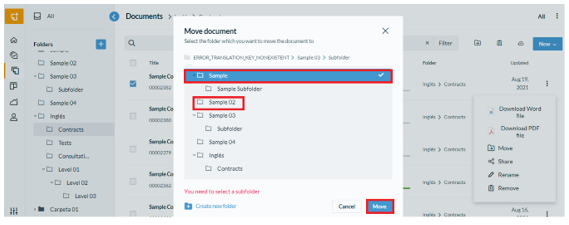
You can also move multiple documents in bulk. To do so, simply select all documents and select the icon  which represents the “Move” option.
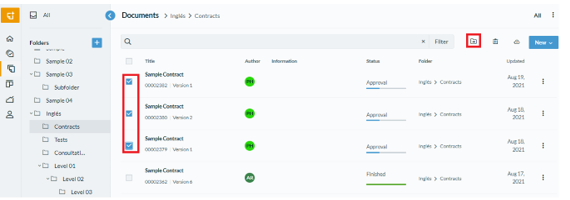
At the end, just select the desired folder and subfolder, select “Move” and the procedure will be complete:
Comments
0 comments
Please sign in to leave a comment.